
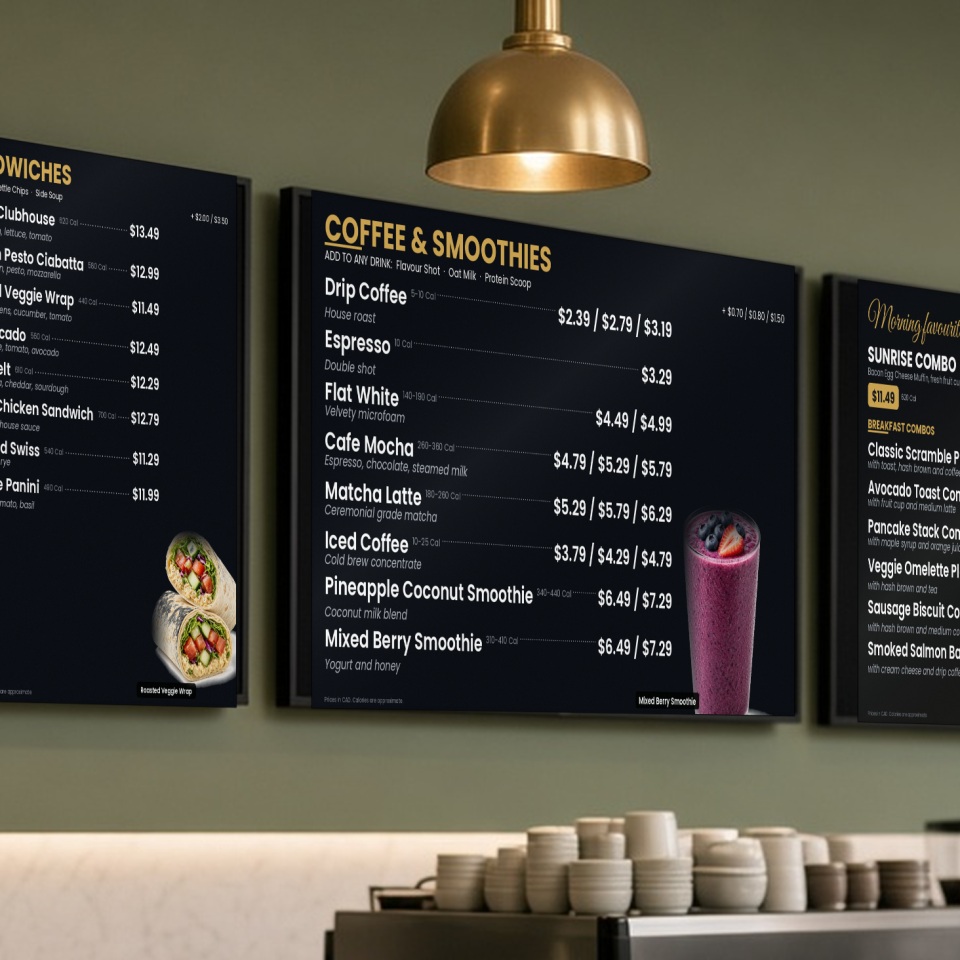
You know the scene. There’s a strip of tape over last month’s price, a handwritten “sorry, we’re out” sign on the breakfast sandwich at noon, and a menu panel that nobody has touched since spring. If you run a quick service restaurant (QSR), that counter is where the first impression happens and where your guests make up their minds, and it’s working against you every time a price changes. On a printed board, every change means more printing, more cost, more tape, or a price that doesn’t match your point of sale (POS) system. A digital menu board is simply a commercial screen that shows your menu and can be updated from a computer. You make the change once, and whether you have one location or 100, it shows up accurately on every screen. Here are nine practical reasons the best quick service restaurants use them, plus a few honest questions to ask before you buy.
The short answer: Digital menu boards let a quick service restaurant change prices, take sold-out items off the board and switch menus by time of day in minutes, and when they’re connected to your POS, the board and the register always match. The trade-offs are the upfront cost and the need for commercial-grade screens and a reliable network, so ask the right questions before you buy.
9 reasons restaurants use digital menu boards
1. Change a price in minutes, not days
Cost pressure isn’t letting up for anyone. Restaurants Canada’s second-quarter 2026 report found that 64% of operators say profitability is lower than last year, and 41% are operating at a loss or just breaking even. Canada’s Food Price Report 2026 also forecast restaurant food prices rising 4% to 6% this year. When your costs move that often, a printed board turns every adjustment into a small project: design it, print it, wait for it, put it up, pay for it. Digital menu boards are an investment, sure, but once they’re up, you make the edit and it shows up on the screen. That’s it. Made a mistake, or prices changed again? It takes about 10 minutes to fix, so your restaurant can adapt as soon as prices move.
2. Your board and your register always agree
Here’s one every owner has lived through: a guest points at the board, the register rings in something different, and now you’re having an awkward conversation in front of a line. When your boards are connected to your POS, the price on the screen is the price that rings in, every time. Change it in the POS menu, which you have to do anyway, and the boards follow along. One update does the work of two, so your managers get that time back. It’s not a small thing. Pricing errors wear down the confidence of your customers and your staff alike.
3. Sold out? 86 items automatically
I once met a restaurant owner who told me, “Ideally, we sell out of everything.” Two weeks later, I met another who told me, “If we run out of something, we’ve f’d up, because there’s a disappointed customer.” Both were very successful in their own right. What that taught me is that every business is different, and there’s more than one way to run a successful restaurant. Either way, running out of something is part of life in a busy kitchen. Saying no to a guest is bad enough, but the bigger offence is advertising an item you can’t serve. With boards connected to your POS, you mark the item sold out in the POS and it comes off the screen (and off your self-service kiosks and online ordering, if you use them). Guests don’t fall in love with something you can’t make, your staff stop repeating “sorry, we’re out” all afternoon, and the line keeps moving instead of stalling while someone picks a second choice.
4. The right menu at the right time of day
Breakfast can switch over to lunch on its own, and your dinner menu can appear right on schedule, without anyone climbing a stepladder or remembering to swap the placard. You can schedule menus by time of day, day of the week, or for a special event. That matters, because Restaurants Canada’s Foodservice Facts 2026 notes that breakfast and lunch are outperforming other times of day. Those are exactly the hours when you want your board working its hardest, showing the right items to the right crowd.
5. Put your best sellers and deals front and centre
Whatever the market is doing, guests are always watching their wallets. Restaurants Canada reported in August 2026 that half of quick service guests say they’re looking for promotions, discounts and deals, and more than eight in ten Canadians say affordability is at least a moderate factor in choosing where to eat. A screen makes it easy to rotate a combo, a seasonal drink or a limited-time item into the spotlight, and take it down again when it’s done. Research also suggests that showing food in motion, with a short video instead of a still photo, can draw people toward the more indulgent choice (Journal of Marketing, 2015). Nobody can promise you a number, but it’s a nice tool to have.
6. A wait that feels shorter (and a line that moves)
Nobody loves standing in line, but a clear, good-looking board gives guests something to read and decide on while they wait. There’s a classic piece of service research, David Maister’s “The Psychology of Waiting Lines”, that makes a simple point: time spent occupied feels shorter than time spent doing nothing. He even uses restaurants handing out menus to waiting guests as an example. Guests who have already decided by the time they reach the counter order faster. Simple as that.
7. No more reprinting, taping and tossing old panels
Think about what a single printed menu change really costs you. Someone has to update the design, someone has to print it, someone has to swap it out, and the old panel goes in the bin. Do that for every price change, every new item and every promotion, in every store, and it adds up over time, in money and in your staff’s hours. With a screen, a change takes a few minutes and there’s nothing to throw away. We won’t pretend to know your exact savings, because every restaurant is different, but we can promise you this: the trips to the print shop stop.
8. Every location looks the same (or as different as you want)
If you run more than one store, you already know how hard it is to keep every location consistent, and consistency is key. With digital menu boards, you can update every location from one place, keep prices and items the same everywhere, or tailor each store to its own neighbourhood. There’s an Ontario angle here too. If your business is part of a chain with 20 or more locations in Ontario, the province requires calories on menu boards, shown in the same font and format, and at least the same size, as the item name or price, along with a required statement about daily calorie needs. Connected menu boards make it easier to keep those numbers right when your items, or the rules, change.
9. Easier to read, better looking, and on brand
Bright commercial screens with your own photos, logo and colours make your counter look as good as your food. Ready-made templates and a simple drag-and-drop editor mean you don’t need any design experience, and Armagh POS Solutions will help you build your first boards. A couple of practical tips from the Canadian National Institute for the Blind (CNIB) and its Clear Print guidelines go a long way: use strong contrast (dark text on a light background, or the other way around), stick with plain, easy fonts, and resist the urge to cram everything onto one screen. If a guest can read it from the back of the line, you’ve done it right.
Before you buy: honest questions to ask
Digital menu boards aren’t magic, and they’re not the right fit for every counter. Before you sign anything, here’s what we’d ask if we were in your shoes:
- What does it cost upfront, and can I spread it out? Every setup is different, so get a written quote for your space.
- Are the screens commercial grade? A home television isn’t built to run all day, every day. Ask about brightness, rated hours, and whether the warranty covers commercial use.
- Where will the screens go? Screens near big windows or in direct sun need enough brightness to stay readable. Ask your installer to look at your space at the brightest time of day.
- How do the screens connect, and what happens if the internet drops? A wired connection is recommended, and a reliable network matters, so ask about a secure, managed network. Then ask what happens to your screens if the internet goes down. Do the menus disappear, or do they stay up? Ours keep showing your menu, and pick up any changes once the connection is back.
- Who installs the screens? Ask who mounts them and who supplies the mounting hardware. We supply and install both, the screens and the mounting hardware.
- Who updates the menu? You, your staff, or your dealer? Make sure you get staff training, or ask us about our optional menu maintenance service, where we handle your menu changes for you.
- Who do I call when a screen goes dark on a Friday night? Local installation and 24/7 support make a real difference. Armagh has provided both to Ontario restaurants, right here from Hamilton, since 1979.
- Does it connect to my POS? If it doesn’t, prices and sold-out items won’t match automatically. We can help you connect your POS and your menu boards and streamline your operation.
About Armagh POS Solutions
Armagh POS Solutions is a Hamilton-based POS specialist serving Canada’s retail, restaurant, and grocery industries since 1979. We deliver complete point-of-sale systems for single-location independents and multi-unit chains: Catapult Retail POS, Genius Restaurant POS, cash registers, Ishida and other commercial scales, Toshiba terminals, self-checkout, mobile POS, self-service kiosks, online ordering, loyalty, liquor inventory, grocery labelling, and integrated credit and debit. Our team consults on process automation, inventory accuracy, customer-service speed, and restaurant order management, then installs, trains, and supports the system 24/7. Armagh has been a big name in small business for 45+ years.